Waking up to the unexpected buzz of your electric toothbrush, seemingly activating on its own, can be an unsettling experience. It feels like a poltergeist in your bathroom, but rest assured, this common electric toothbrush glitch usually has a logical explanation and a practical solution. Whether it’s happening randomly in your drawer or mid-brushing, understanding why your electric toothbrush decides to “turn itself on” is the first step to restoring peace and proper function to your oral hygiene routine. This guide will walk you through the most common causes and provide actionable, step-by-step fixes to silence that phantom buzz and ensure your brush only works when you want it to.
Understanding Why Your Electric Toothbrush Acts Possessed
Before diving into fixes, it’s helpful to understand the underlying reasons an electric toothbrush might spontaneously activate. While it can feel like a mystery, these devices are essentially mini-computers with batteries, circuits, and mechanical parts. Like any electronic gadget, they are susceptible to various issues that can cause erratic behavior. Identifying the potential culprit will help you narrow down the best solution.
Common Reasons for Self-Activation:
- Debris Around the Power Button: Over time, toothpaste residue, water minerals, or general grime can build up around the power button. This sticky accumulation can cause the button to become partially stuck or overly sensitive, leading to unintentional activations. It’s a surprisingly frequent cause of a “ghost” turning on your brush.
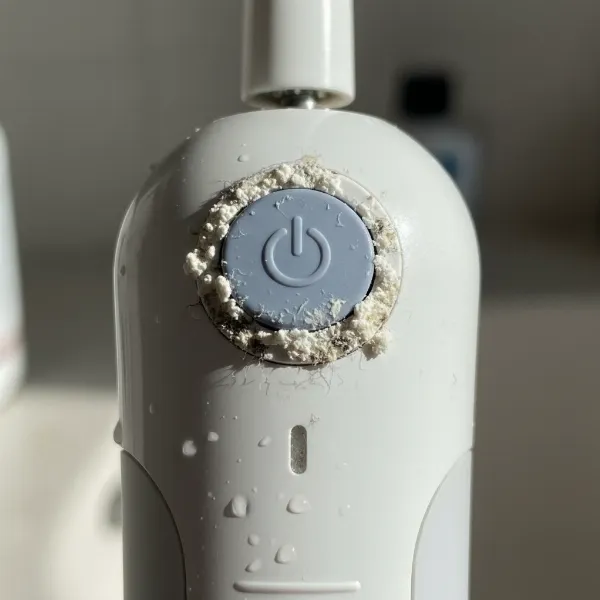 Close-up of electric toothbrush power button with toothpaste residue and grime around it
 - Moisture Ingress: Electric toothbrushes are designed to be water-resistant, but they are rarely completely waterproof. If water or excessive moisture seeps into the internal electronics, it can create unintended electrical connections, short circuits, or interfere with the sensitive internal sensors, causing the brush to switch on. Condensation is a common culprit here.
- Battery Issues: A failing or low battery can lead to erratic behavior. As batteries degrade, their voltage output can become unstable, causing the toothbrush’s internal circuits to misinterpret signals and trigger activation. Corroded battery contacts can also disrupt the power flow, leading to similar issues.
- Internal Electronic Glitches: Sometimes, the problem lies deeper within the toothbrush’s circuitry or software. A minor fault on the circuit board, a loose internal wire, or a software bug (especially in smart toothbrushes with advanced features) can cause the device to activate without user input.
- Physical Damage or Wear and Tear: Drops or prolonged use can lead to internal components becoming loose or damaged. This physical stress might affect the power button mechanism or internal sensors, contributing to the toothbrush turning on by itself.
|
Our Picks for the Best Electric Toothbrush in 2026
As an Amazon Associate I earn from qualifying purchases.
|
||
| Num | Product | Action |
|---|---|---|
| 1 | Philips Sonicare 2100 Series Electric Toothbrush - Sonic Toothbrush with Advanced Sonic Technology, Two Intensity Settings, Smartimer & Quadpacer, White, Model HX3661/04 |

|
| 2 | Oral-B Pro 1000 Rechargeable Electric Toothbrush, Black |
|
| 3 | Philips Sonicare 1100 Series Electric Toothbrush - Sonic Toothbrush with Advanced Sonic Technology, EasyStart, Smartimer & Quadpacer, White, Model HX3641/02 |
|
| 4 | Onlyone Sonic Electric Toothbrush for Adults, Rechargeable Ultrasonic Electric Toothbrush with 8 Brush Heads, Travel Case, Charging Base & Wireless Charging - 5 Modes with Smart Timer |
|
| 5 | COSLUS Sonic Electric Toothbrush for Adults C40(DY-108Pro): 47000 VPM for Deep Cleaning with Travel Case - 5 Modes for Sensitive Teeth & Brace, Wireless Charging, 6 Brush Heads for Family, Black (1PC) |
|
| 6 | Philips Sonicare 4100 Rechargeable Electric Toothbrush, Advanced Plaque Removal, Pressure Sensor, Includes Brush Head Case, White BD5002AZ |
|
| 7 | Oral-B iO Simple Clean Rechargeable Electric Powered Toothbrush, Pure White with 1 Gentle Care Brush Head and 1 White Travel Case - Automatic Pressure Sensor to Protect Gums - 3 Modes -2 Min Timer |
|
| 8 | Oral-B iO Simple Clean Rechargeable Electric Powered Toothbrush, Night Black with 1 Gentle Care Brush Head and 1 Black Travel Case - Automatic Pressure Sensor to Protect Gums - 3 Modes - 2 Min Timer |
|
| 9 | Oral-B Pro 1000 Rechargeable Electric Toothbrush, White |
|
| 10 | Philips Sonicare 4100 Series Electric Toothbrush - Sonic Toothbrush with Advanced Sonic Technology, Pressure Sensor, Two Intensity Settings, Smartimer & Quadpacer, Deep Pink, Model HX3681/26 |
|
Step-by-Step Solutions to Fix Your Self-Activating Electric Toothbrush
Don’t let a “haunted” toothbrush disrupt your day. Most of these issues can be resolved with some simple troubleshooting. Here’s how to tackle the problem, starting with the easiest fixes.
1. The Essential Clean-Up: Power Button and Charging Contacts
Often, the simplest solution is the most effective. Accumulated grime is a common offender.
- Clean Around the Power Button: Use a damp cloth or a cotton swab dipped in rubbing alcohol to meticulously clean around the power button and any crevices. Pay close attention to removing any visible toothpaste residue or hard water deposits. Gently press the button several times after cleaning to ensure it moves freely without sticking.
- Inspect and Clean Charging Contacts: Examine the charging base and the bottom of your electric toothbrush for any signs of corrosion or dirt on the metallic contacts. Clean them thoroughly with a dry cloth or a pencil eraser to ensure a solid connection. Poor charging can sometimes lead to power-related glitches.
- Ensure Dryness: After each use, wipe your toothbrush dry. If you suspect moisture has entered the device, try leaving it in a dry, well-ventilated area (not on its charging base) for 24-48 hours to allow any internal condensation to evaporate. You can also place it in a bowl of rice for a day or two, similar to drying a wet phone.
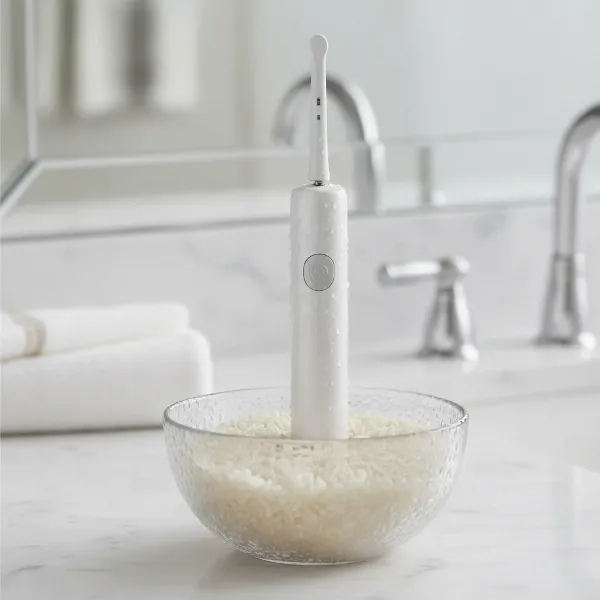 Electric toothbrush handle drying in a bowl of white rice to absorb internal moisture
2. Recharge and Reset: The Power of a Full Battery
Battery problems are a leading cause of erratic electronic behavior.
- Charge Fully: Place your electric toothbrush on its charger and allow it to charge for a full 24 hours, even if the indicator light suggests it’s full earlier. A complete charge can sometimes stabilize the battery and internal electronics, resolving intermittent issues.
- Perform a Soft Reset: Many electric toothbrushes can be soft reset. While on the charger, or immediately after removing it, press and hold the power button for 10-20 seconds. The toothbrush might cycle through its modes or flash lights before turning off completely. This process can clear minor software glitches. Consult your specific toothbrush’s manual for exact reset procedures, as these can vary by brand and model.
3. Advanced Troubleshooting for Smart Electric Toothbrushes
If your electric toothbrush connects to an app, there might be software-related solutions.
- Disconnect from App: Open your toothbrush’s companion app and try disconnecting or “forgetting” the device. Then, attempt a factory reset if the option is available in the app or via a button combination (refer to your manual).
- Firmware Update: Check the app or the manufacturer’s website for any available firmware updates for your toothbrush model. Updating the firmware can resolve known software bugs that might be causing spontaneous activation.
4. When to Consider a Battery Replacement
If battery issues persist despite full charging and resets, an aging or faulty battery could be the cause.
- Battery Degradation: Like all rechargeable batteries, those in electric toothbrushes have a finite lifespan. If your brush is several years old and exhibiting erratic power behavior, the battery may be nearing the end of its life.
- Professional Replacement: While some savvy DIYers might attempt to replace the battery themselves, it often requires specific tools and technical knowledge. For most users, it’s best to consult the manufacturer’s support or a qualified technician for battery replacement to avoid further damage.
5. Inspecting for Internal Moisture or Damage (Use Caution)
For persistent issues and if you’re comfortable with minor electronics repair, you might consider inspecting the internal components.
- Accessing the Interior: Many toothbrushes can be opened by carefully prying off the bottom cap. You might need a thin, flat-blade screwdriver or similar tool. Proceed with extreme caution, as this can void warranties and potentially damage the device.
- Drying and Cleaning Inside: Once opened, carefully inspect for any visible moisture, corrosion, or debris. Use a soft, dry cloth or cotton swab to clean components. A small amount of electronic contact cleaner (like DeoxIT) can be used on corroded contacts if available.
- Checking for Loose Connections: Gently check for any loose wires or components on the circuit board. If anything appears disconnected, and you have the expertise, you might be able to re-seat it.
- Reassembly: Ensure all seals are properly aligned when reassembling to prevent future moisture ingress.
“A common misconception is that electric toothbrushes are fully waterproof. They are water-resistant, which means splashes are fine, but prolonged submersion or internal moisture can wreak havoc on their delicate electronics.” – Dr. Elena Petrova, Dental Device Specialist
6. Prevention is Key: Keeping Your Electric Toothbrush in Top Shape
Proactive care can prevent many of these frustrating issues from arising.
- Daily Cleaning Habits: After each brushing, rinse your toothbrush head and handle thoroughly under running water. Wipe the handle dry with a towel, especially around the power button and charging contacts.
- Proper Storage: Store your electric toothbrush upright in a dry place, away from excessive moisture. Avoid leaving it in standing water or in a humid shower stall where condensation can easily build up.
- Regular Maintenance Checks: Periodically remove the brush head and clean the area where it connects to the handle. This prevents toothpaste buildup from accumulating in hard-to-reach places. Ensure charging contacts remain clean and free of obstruction.
When to Seek Professional Help or Consider Replacement
If you’ve tried all the troubleshooting steps and your electric toothbrush continues to turn on by itself, it might be time to call in the experts or consider a new device.
- Warranty and Customer Support: Check if your electric toothbrush is still under warranty. Most reputable brands offer a 1-2 year warranty period. Contact the manufacturer’s customer support; they can offer specific troubleshooting advice, repair services, or a replacement.
- Signs It’s Time for a New One: If the toothbrush is old, consistently malfunctioning despite your best efforts, or if the cost of repair approaches the cost of a new one, it’s usually more practical to invest in a replacement. A well-functioning electric toothbrush is crucial for optimal oral health.
Conclusion
An electric toothbrush that turns on by itself is a frustrating but often fixable problem. By systematically addressing common issues such as accumulated grime, moisture, battery problems, and minor electronic glitches, you can often restore your device to its proper working order. Remember to prioritize cleanliness, ensure thorough drying, and maintain your brush regularly to prevent future occurrences. If simple fixes don’t work, don’t hesitate to consult the manufacturer or consider an upgrade to ensure your daily brushing experience remains hassle-free and effective. What other unexpected quirks have you encountered with your Electric Toothbrush, and how did you resolve them?
Frequently Asked Questions
Why does my electric toothbrush turn on when I put it on the charger?
This often indicates a sensitivity issue with the power button or minor interference from the charging process. Try cleaning around the power button thoroughly and ensure the charging contacts are dry and free of debris. A full 24-hour charge can also help stabilize the internal electronics.
Can water damage cause an electric toothbrush to turn on randomly?
Yes, water ingress is a very common cause. Even if your toothbrush is water-resistant, prolonged exposure to moisture can cause internal components to short circuit or misinterpret signals, leading to spontaneous activation. Drying the toothbrush thoroughly is crucial in such cases.
How do I factory reset my electric toothbrush?
Factory reset procedures vary by brand and model. For many, holding the power button for 10-20 seconds while the toothbrush is on or off the charger can initiate a soft reset. For smart toothbrushes, check the companion app or the user manual for specific factory reset instructions, which might involve a combination of buttons or app-based commands.